
SLSWC adds two custom WooCommerce product types for selling software with license management.
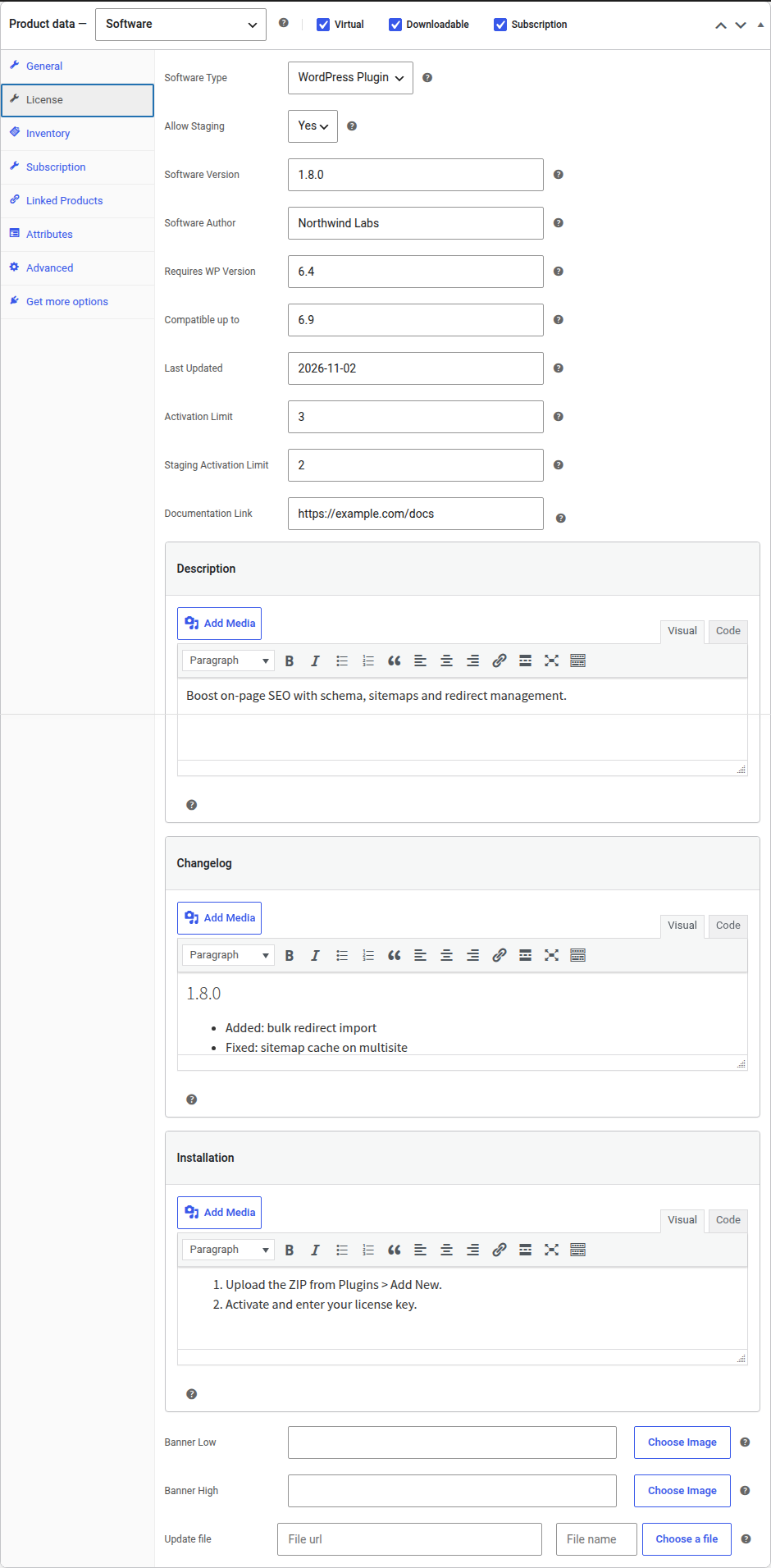
Note on keys: The form fields on the product screen are named
slswc_software_*, but the software data is stored in post meta keys that start with an underscore (_slswc_software_*), for both products and variations. Subscription settings are stored without the underscore (slswc_subscription_*). The subscription flag itself is_slswc_software_subscription. Theslswc_part follows the plugin prefix.
Software
A simple product type for single-tier software. Select Software from the Product data dropdown when creating a product.
Supports: virtual, downloadable, licensed software with a single price point.
Variable Software
A variable product type for tiered software plans (e.g., Personal, Business, Agency). Select Variable Software from the Product data dropdown.
Each variation can have its own subscription price, activation limits, renewal period and gateway IDs. See Variable Software Variations below.
License Tab
Both product types add a License tab to the product data panel. This tab contains fields that define the software metadata sent to update clients.
| Field | Key | Type | Required | Description |
|---|---|---|---|---|
| Software Type | _slswc_software_type | Select | No | The kind of software (plugin, theme, etc.). |
| Allow Staging | _slswc_software_allow_staging | Select | Yes | Whether licenses for this product can be activated on staging sites. Options: Yes, No. |
| Software Version | _slswc_software_version | Text | Yes | The current software version number (e.g., 1.2.3). |
| Software Author | _slswc_software_author | Text | No | The author of the software. |
| Requires WP Version | _slswc_software_required_wp | Text | Yes | The minimum WordPress version required. |
| Compatible up to | _slswc_software_compatible_to | Text | No | The WordPress version tested up to. |
| Last Updated | _slswc_software_updated | Date | Yes | When the software was last updated. Date picker, YYYY-MM-DD format. |
| Activation Limit | _slswc_software_activations | Number | No | Maximum number of live site activations allowed. Leave empty or 0 for unlimited. Hidden on Variable Software products, where it is set per variation. |
| Staging Activation Limit | _slswc_software_staging_activations | Number | No | Maximum number of staging site activations allowed. Leave empty or 0 for unlimited. Hidden on Variable Software products, where it is set per variation. |
| Documentation Link | _slswc_software_documentation_link | URL | No | Public link to the software documentation. |
| Description | _slswc_software_description | Rich text | No | Description displayed in the plugin/theme details popup. |
| Changelog | _slswc_software_change_log | Rich text | No | Changelog displayed in the plugin/theme details popup. |
| Installation | _slswc_software_installation | Rich text | No | Installation instructions displayed in the details popup. |
| Banner Low | _slswc_software_banner_low | Image | No | Low resolution banner (772×250 recommended). |
| Banner High | _slswc_software_banner_high | Image | No | High resolution banner (1544×500 recommended). |
| Update file | _slswc_software_update_file | File | Yes | The ZIP file served as an update for the software. Click Choose a file to pick or upload it. |
Description, Changelog and Installation are rich-text editors. Basic HTML (headings, lists, links, bold text) is allowed; anything else is stripped on save with wp_kses_post. The software Description is stored separately from the WooCommerce product description, in its own _slswc_software_description meta, and is what update clients show in the plugin details popup.
Note: Fields marked as required are highlighted in the editor, but the product still saves if they are empty. Fill them in so update clients receive complete information.
Enabling Subscriptions
Software and Variable Software products show a Subscription checkbox in the product-type row, next to Virtual and Downloadable (tooltip: "Charge a recurring subscription fee for this software product."). It is stored in _slswc_software_subscription.
- Software: ticking Subscription hides the price fields on the General tab. The price comes from the Subscription price on the Subscription tab, and the product's price falls back to the renewal fee so it stays purchasable.
- Variable Software: the General-tab price fields are always hidden, because prices are set per variation. Variations inherit the parent's Subscription setting.
Subscription Tab
The Subscription tab holds the recurring billing settings. The fields, in the order they appear:
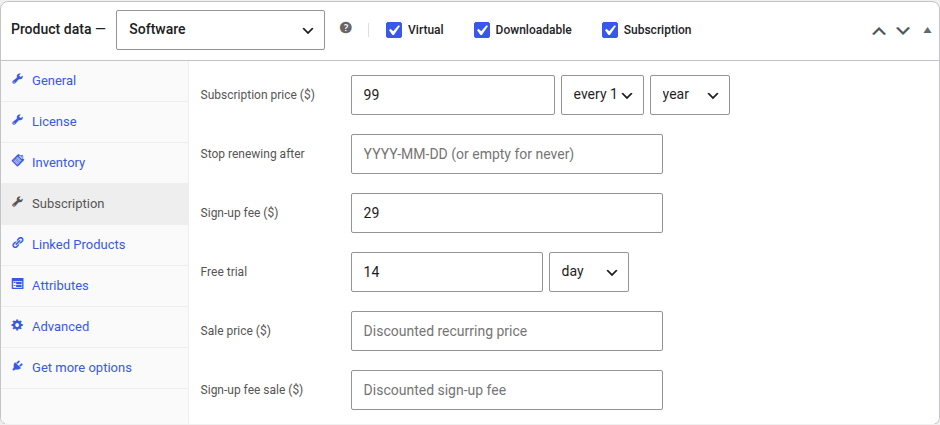
| Field | Key | Type | Description |
|---|---|---|---|
| Subscription price | slswc_subscription_renewal_fee | Price | The recurring renewal fee. |
| ↳ every N | slswc_subscription_interval | Select | Bill every 1 to 6 periods. |
| ↳ period | slswc_subscription_period | Select | Billing period: day, week, month or year. |
| Stop renewing after | slswc_subscription_end_date | Date | YYYY-MM-DD, or leave empty to renew forever. |
| Sign-up fee | slswc_subscription_signup_fee | Price | One-time fee charged at sign-up. |
| Free trial | slswc_subscription_trial_length | Number | Length of the free trial (0 for no trial). |
| ↳ trial period | slswc_subscription_trial_period | Select | Trial period unit: day, week, month or year. |
| Sale price | slswc_subscription_renewal_fee_sale | Price | Discounted recurring price. |
| Sign-up fee sale | slswc_subscription_signup_fee_sale | Price | Discounted sign-up fee. |
Empty fields are prefilled from the defaults at WP Admin > License Server > Settings > Subscriptions > Product Defaults (options slswc_sub_default_*).
Variable Software Variations
Each Variable Software variation panel has three groups of fields.
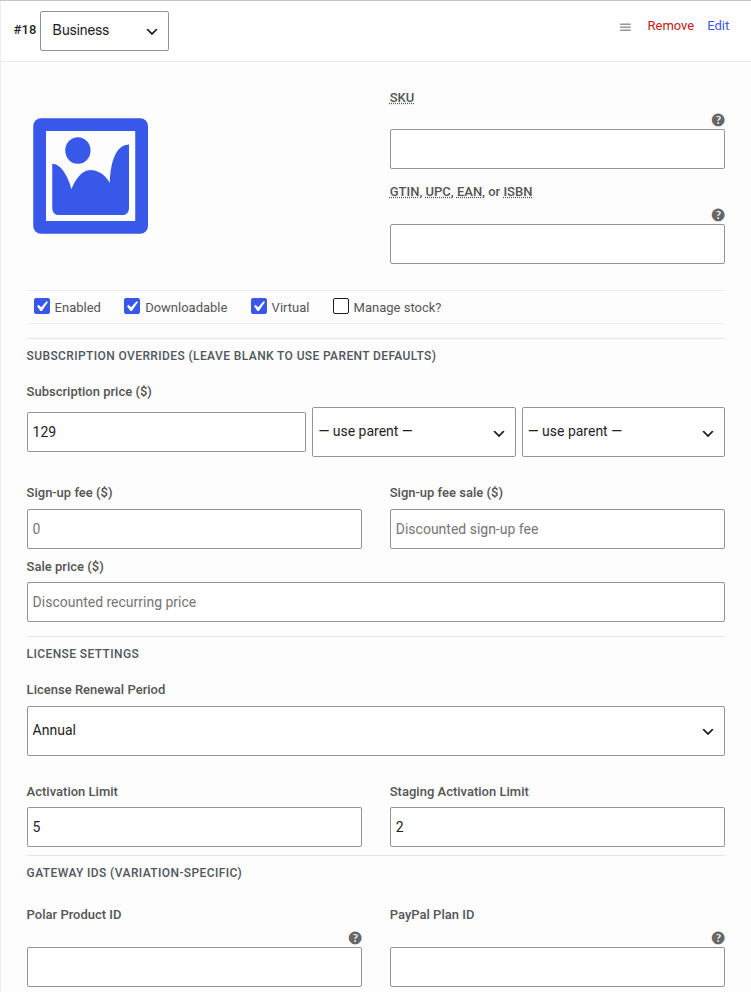
Subscription overrides (leave blank to use parent defaults)
| Field | Key | Description |
|---|---|---|
| Subscription price + every N + period | slswc_subscription_renewal_fee, slswc_subscription_interval, slswc_subscription_period | The variation's recurring price. Interval and period default to "— use parent —". |
| Sign-up fee | slswc_subscription_signup_fee | Overrides the parent's sign-up fee. |
| Sign-up fee sale | slswc_subscription_signup_fee_sale | Overrides the parent's sign-up fee sale price. |
| Sale price | slswc_subscription_renewal_fee_sale | Overrides the parent's recurring sale price. |
The free trial cannot be overridden per variation; it always comes from the parent product.
License settings
| Field | Key | Description |
|---|---|---|
| License Renewal Period | _slswc_software_renewal_period | How long the license is valid before renewal. |
| Activation Limit | _slswc_software_activations | Live site activations for this tier. |
| Staging Activation Limit | _slswc_software_staging_activations | Staging site activations for this tier. |
These are set per variation and do not fall back to the parent.
Gateway IDs (variation-specific)
| Field | Key | Description |
|---|---|---|
| Polar Product ID | _polar_product_id | The Polar product for this tier. Falls back to the parent if blank. |
| PayPal Plan ID | _paypal_plan_id | The PayPal billing plan for this tier. Falls back to the parent if blank. |
When the parent has Subscription ticked, the variation's regular price is synced automatically from its resolved subscription price, so the regular and sale price inputs are hidden. Variations are created as virtual and downloadable, and those checkboxes are locked.
Renewal Period
On the General tab (in the downloads area), Software products also show a License Renewal Period dropdown. This determines how long a license is valid before needing renewal. It is hidden on Variable Software products, where each variation sets its own.
The available periods are configured at WP Admin > License Server > Settings > Subscriptions > Renewal Periods. The defaults are Annual, Monthly, Quarterly and Lifetime.
How Subscription Prices Are Shown
On the product page, a subscription price always starts with the recurring price and period, for example $19.00 / month or $49.00 / 3 months. When a sale price is set, the regular price is shown struck through. A second line is added depending on the setup:
| Setup | Extra line on the product page |
|---|---|
| Free trial + sign-up fee | Sign-up fee: $X today + N-period free trial |
| Free trial only | Start with a free N-period trial |
| Sign-up fee + renewal | + $X signup fee (first payment: $Y) |
| Renewal only | (nothing extra) |
In the cart, each subscription line shows a note:
| Setup | Cart note |
|---|---|
| Free trial + sign-up fee | $X sign-up fee today + N-period free trial, then $Y / period |
| Free trial only | Free trial — then $Y / period |
| Sign-up fee only | Includes $X signup fee — renews at $Y / period |
| Renewal only | $Y / period |
When a free trial is set, the cart charges only the sign-up fee today (or nothing, if there is no sign-up fee). The recurring price is charged when the trial ends.