
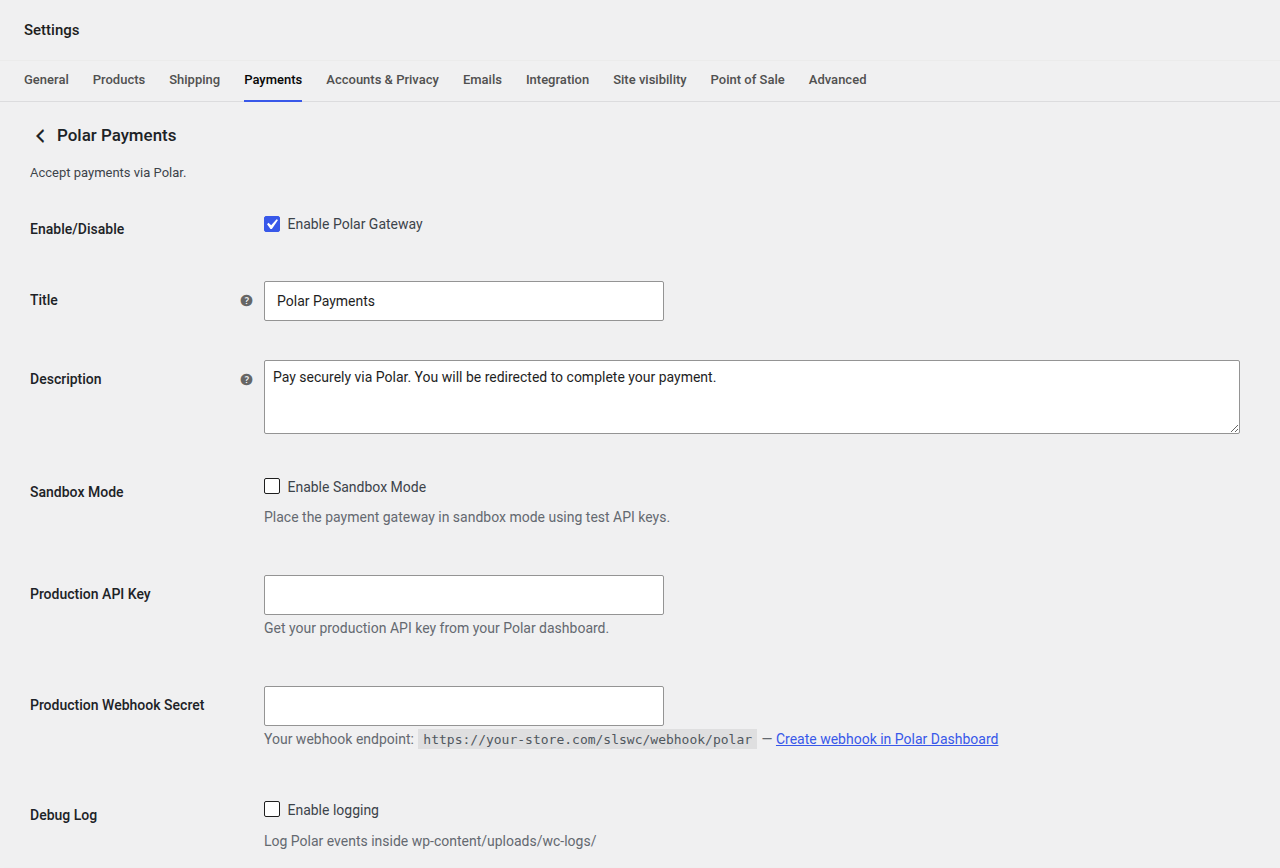
Navigation: WP Admin > WooCommerce > Settings > Payments > Polar Payments
Accept payments via Polar. Customers are redirected to Polar's hosted checkout page to complete their payment. Supports one-time payments, refunds, and recurring subscriptions.
Features
- Hosted checkout via Polar
- Recurring subscription billing
- Refunds via WooCommerce order screen
- Block checkout support
Prerequisites
Each WooCommerce product that uses Polar must have a corresponding Polar product. Enter its ID in the Polar Product ID field on the product's General tab (stored in the _polar_product_id meta field). Without this, orders will fail at checkout.
For Variable Software products, each variation has its own Polar Product ID under Gateway IDs (variation-specific). If a variation's field is blank, the parent product's ID is used. See Product Types.
Configuration Fields
| Field | Type | Default | Description |
|---|---|---|---|
| Enable/Disable | Checkbox | no | Enable Polar Gateway. |
| Title | Text | Polar Payments | Title displayed to the customer during checkout. |
| Description | Textarea | Pay securely via Polar. You will be redirected to complete your payment. | Description displayed during checkout. |
| Sandbox Mode | Checkbox | yes | Place the payment gateway in sandbox mode using test API keys. |
| Sandbox API Key | Password | (empty) | Get your sandbox API key from your Polar dashboard. |
| Sandbox Webhook Secret | Password | (empty) | Webhook signing secret for sandbox mode. |
| Production API Key | Password | (empty) | Get your production API key from your Polar dashboard. |
| Production Webhook Secret | Password | (empty) | Webhook signing secret for production mode. |
| Debug Log | Checkbox | no | Log Polar events inside wp-content/uploads/wc-logs/. |
Webhook Setup
Configure a webhook in the Polar Dashboard pointing to:
Sandbox: sandbox.polar.sh/dashboard/settings/webhooks Production: polar.sh/dashboard/settings/webhooks
Webhook URL:
https://your-store.com/slswc/webhook/polar/Copy the signing secret into the corresponding Webhook Secret field.
Getting Your Polar API Credentials
- Log in to your Polar account:
- Sandbox: sandbox.polar.sh
- Production: polar.sh
- Navigate to Settings > Developers (or Settings > API Keys).
- Click Create API Key (or Generate New Key).
- Give the key a descriptive name (e.g., "SLSWC Store") and select the necessary permissions.
- Copy the generated API key into the Sandbox/Production API Key field in SLSWC.
- For the webhook secret: navigate to Settings > Webhooks, click Add Webhook, enter your webhook URL (
https://your-store.com/slswc/webhook/polar/), select the events to listen for, and save. - Copy the Webhook Secret (signing secret) into the corresponding field in SLSWC.
Tip: Always test your integration in sandbox mode first. The Polar sandbox environment uses separate accounts and data from production.
Troubleshooting
Checkout fails with "Product not found" or similar error
- Each WooCommerce product that uses Polar must have a corresponding Polar Product ID stored in the
_polar_product_idmeta field. Without this, orders fail at checkout. - Verify the Polar Product ID is set on the product's General tab. For Variable Software, check the variation's Polar Product ID under Gateway IDs (variation-specific), or the parent's if the variation's is blank.
- Ensure the Polar Product ID matches an existing product in your Polar account (sandbox or production, matching your current mode).
Webhook events are not being received
- Verify the webhook URL in your Polar Dashboard matches exactly:
https://your-store.com/slswc/webhook/polar/(including the trailing slash). - Check that the Webhook Secret matches the signing secret shown in your Polar Dashboard.
- Ensure your server accepts incoming POST requests and responds with HTTP 200.
- Enable Debug Log and check
wp-content/uploads/wc-logs/for webhook signature verification errors.
Subscription renewals are not reflected in SLSWC
- Polar handles subscription billing on its side and notifies SLSWC via webhooks. If webhooks are not being delivered, subscription renewals will not be reflected.
- Check the webhook delivery log in your Polar Dashboard to see if events are being sent successfully.
- Verify that the subscription exists in your Polar account and its status is active.
Sandbox transactions do not appear in production (or vice versa)
- Polar sandbox and production are completely separate environments with separate accounts, products, and API keys. Ensure you are using the correct API key and webhook secret for your current mode.
- If you have switched from sandbox to production, update both the API Key and Webhook Secret fields to use your production credentials.