
SLSWC runs its background maintenance tasks as scheduled actions on WooCommerce's Action Scheduler. Since version 1.0.1 every job is registered in the slswc action group instead of as a WordPress cron event. The hook names are unchanged, so code that listens for them keeps working.
The schedules are registered when the plugin is activated. If any are missing (for example, because WooCommerce had not loaded yet when SLSWC was activated), they are re-registered automatically on the next admin page load, WP-CLI command, or cron request. Deactivating SLSWC removes all of its pending scheduled actions.
Scheduled Tasks
| Hook | Schedule | Description |
|---|---|---|
slswc_expire_licenses | Daily | Checks all non-expired licenses and expires any that are past their expiry date, deactivating them in the process. Runs on staging environments too. |
slswc_expire_subscriptions | Daily | Handles active subscriptions whose next payment date has passed. If a grace period is configured, they go to on-hold until the grace period ends; otherwise they expire immediately. On-hold subscriptions whose grace period has ended are expired together with their linked license. |
slswc_send_expired_emails | Daily | Sends expiration notification emails to customers whose licenses have expired. Skipped on staging environments. |
slswc_send_expiring_emails | Daily | Sends reminder emails to customers whose licenses are about to expire. The timing is controlled by the "Expiry reminder" setting in General settings. Skipped on staging environments. |
slswc_send_subscription_expiring_emails | Daily | Sends reminder emails for subscriptions due within the reminder window (the "Expiry reminder" setting in weeks, with a minimum of 7 days). A one-day transient prevents duplicate emails for the same subscription. Skipped on staging environments. |
slswc_send_admin_daily_summary | Daily | Sends a summary email to the admin with counts of expired licenses, expiring licenses, active subscriptions, expiring subscriptions, new support tickets, and open tickets. Skipped on staging environments. |
slswc_retry_failed_payments | Every 12 hours | Only does anything when failed payment retry is enabled at Settings > Subscriptions. Retries failed payments for on-hold subscriptions that have retries remaining, in batches of 50, by firing slswc_retry_subscription_payment for each one. Each gateway handles the actual retry (Stripe calls Invoice::pay(), PayPal/Payfast/Polar check remote status). When the maximum number of retries is reached, the subscription enters the grace period or expires. |
slswc_one_time_events | Single action | Fires the slswc_run_one_time_events action, which re-checks every license and sets its status to active, inactive, or expired based on its activations and expiry date. It is a single (non-recurring) action that is queued again whenever the schedules are re-registered and it is not already pending. |
Other Scheduled Actions
| Hook | Group | Description |
|---|---|---|
slswc_auto_resume_subscription | slswc | Single action scheduled when a subscription is suspended and a maximum suspension length is set at Settings > Subscriptions. It resumes the subscription automatically after that number of days. |
| Migration batches | slswc-migrations | Data imports from other license systems run as async actions in their own group so large imports do not time out. |
Checking Status
You can see every SLSWC scheduled action, when it last ran, and when it runs next from the Action Scheduler admin screen.
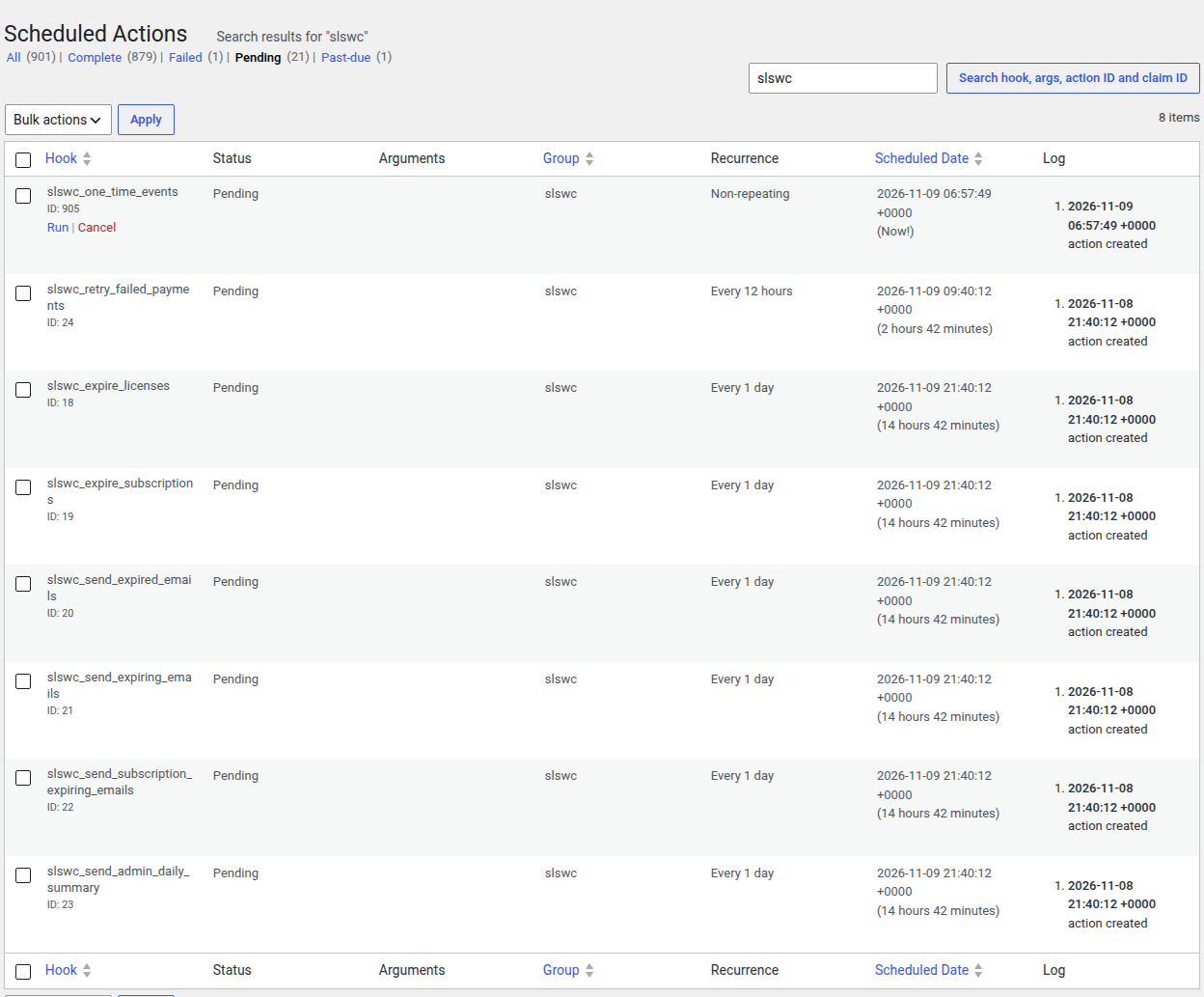
- Go to
WP Admin > WooCommerce > Status > Scheduled Actions(also available atWP Admin > Tools > Scheduled Actions). - Search for
slswc, or filter by theslswcgroup. - Use the Pending, Past-due, and Failed tabs to see what is queued, what is overdue, and what errored. Open a failed action's log to see the error.
- Hover over a pending action and click Run to execute it immediately.
With WP-CLI:
# List SLSWC scheduled actions.
wp action-scheduler action list --group=slswc

# Run all due SLSWC actions now.
wp action-scheduler run --group=slswc
Staging Environment
All email-sending tasks (expired emails, expiring emails, subscription expiring emails, admin daily summary) skip execution when the license server site itself is on a staging URL, to prevent customers from receiving incorrect notifications. License and subscription expiration still run.
What Happens If Scheduled Actions Stop
Action Scheduler's queue runner is started by WP-Cron (and by async requests during admin page loads). If WP-Cron stops running (due to hosting issues, a broken plugin, or a misconfigured server), SLSWC's scheduled actions pile up as past-due and the following consequences accumulate over time:
- Licenses are not expired. Customers with past-due licenses continue to receive updates and can activate on new domains. You are effectively giving away free access.
- Subscriptions are not expired. On-hold and past-due subscriptions remain in their current state indefinitely. The grace period clock does not advance.
- Failed payments are not retried. On-hold subscriptions with remaining retry attempts will not be processed. Revenue that could be recovered through retries is lost.
- Expiry reminder emails are not sent. Customers approaching their expiry date will not receive the reminder emails that prompt them to renew. This directly reduces your renewal rate.
- Admin daily summary is not sent. You lose visibility into daily license and subscription health metrics.
How to detect the problem:
- Open
WP Admin > WooCommerce > Status > Scheduled Actionsand check the Past-due tab forslswcactions. - Run
wp action-scheduler action list --group=slswc --status=pendingvia WP-CLI and look for actions scheduled in the past. - Check
WP Admin > Tools > Site Healthfor cron-related warnings.
How to fix it:
- If you rely on WordPress's built-in cron (triggered by page visits), ensure your site receives regular traffic. Low-traffic sites should use a real system cron instead.
- Set up a system cron job that hits
wp-cron.phpevery few minutes:*/5 * * * * curl -s https://your-store.com/wp-cron.php > /dev/null 2>&1 - Or run the Action Scheduler queue directly from a system cron with WP-CLI:
*/5 * * * * cd /path/to/wordpress && wp action-scheduler run --group=slswc > /dev/null 2>&1 - After restoring the queue, past-due actions run on the next queue run. You can also run them straight away from the Scheduled Actions screen.
Tip: Running the overdue
slswc_expire_licensesaction from the Scheduled Actions screen is the quickest way to catch up on license expirations missed while the queue was down.
Manual Execution
Every scheduled action can be run on demand from WP Admin > WooCommerce > Status > Scheduled Actions (see Checking Status above).
The Settings > Tools tab also has maintenance tools:
- Expire overdue licenses marks licenses whose expiry date has passed as
expired. This is not the same as theslswc_expire_licensesscheduled action: it sets the status and resets the expiry date to yesterday, but it does not deactivate the license's domains. - Recalculate activation counts corrects activation count mismatches.
- Flush rewrite rules re-registers SLSWC's custom endpoints.