
Navigate to My Account > Subscriptions to view and manage your recurring subscriptions.
Endpoint: /my-account/subscriptions/
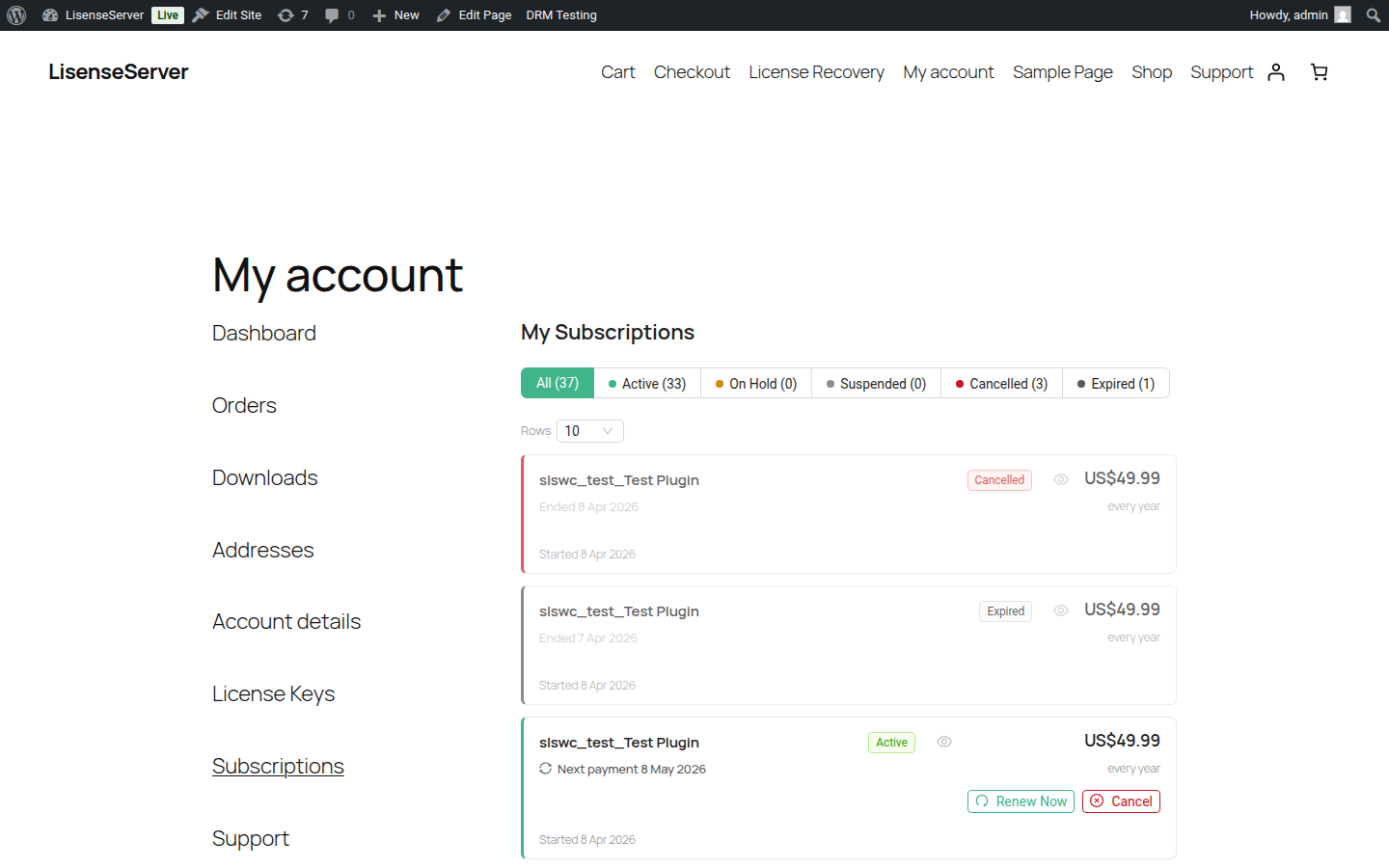
Viewing Your Subscriptions
Each subscription card displays:
- Product name and current status
- Renewal fee and billing cycle (e.g., $49.00 / year)
- Next payment date for active subscriptions, or the end date for ended subscriptions
- Start date and whether the subscription uses manual renewal
- Status counts in the filter bar showing how many subscriptions are in each state
Filtering
- Status filter — Filter by All, Active, On Hold, Suspended, Cancelled, or Expired. Each filter shows a count.
- Rows per page — Choose 5, 10, 20, or 50 subscriptions per page.
Urgency Banners
The page shows contextual banners when subscriptions need attention:
- A warning when subscriptions are paused or on hold
- An info banner when payments are due within 7 days
Subscription Statuses
| Status | Meaning |
|---|---|
| Active | Subscription is current and billing is active |
| On Hold | Subscription is temporarily paused; billing is suspended |
| Suspended | Subscription has been suspended (e.g., failed payment) |
| Cancelled | Subscription has been cancelled; access continues until the end of the current billing period |
| Expired | Subscription has ended and is no longer active |
Viewing Subscription Details
Click the eye icon on any subscription card to open the details drawer. It shows:
- Billing section — Renewal fee, billing cycle, and whether auto-renew is enabled
- Dates section — Start date, next payment date, end date (if ended), and cancellation date (if cancelled)
- Available actions based on the subscription's current state
Managing Your Subscription
Available actions depend on your subscription's current status. The buttons appear both on the subscription card and in the details drawer.
Pause a Subscription
If pausing is available, click Pause. You will be asked to confirm. While paused, you are not charged. Your subscription status changes to On Hold.
Resume a Subscription
If your subscription is paused or on hold, click Resume to reactivate billing.
Cancel a Subscription
Click Cancel and confirm. You retain access until the end of the current billing period, after which the subscription expires. This action cannot be undone.
Renew Early
If early renewal is available, click Renew Now to extend your subscription immediately. Your next payment date is pushed forward.
Deep Linking
Subscription detail links use the format #subscription-123. When you open such a link, the details drawer opens automatically.