
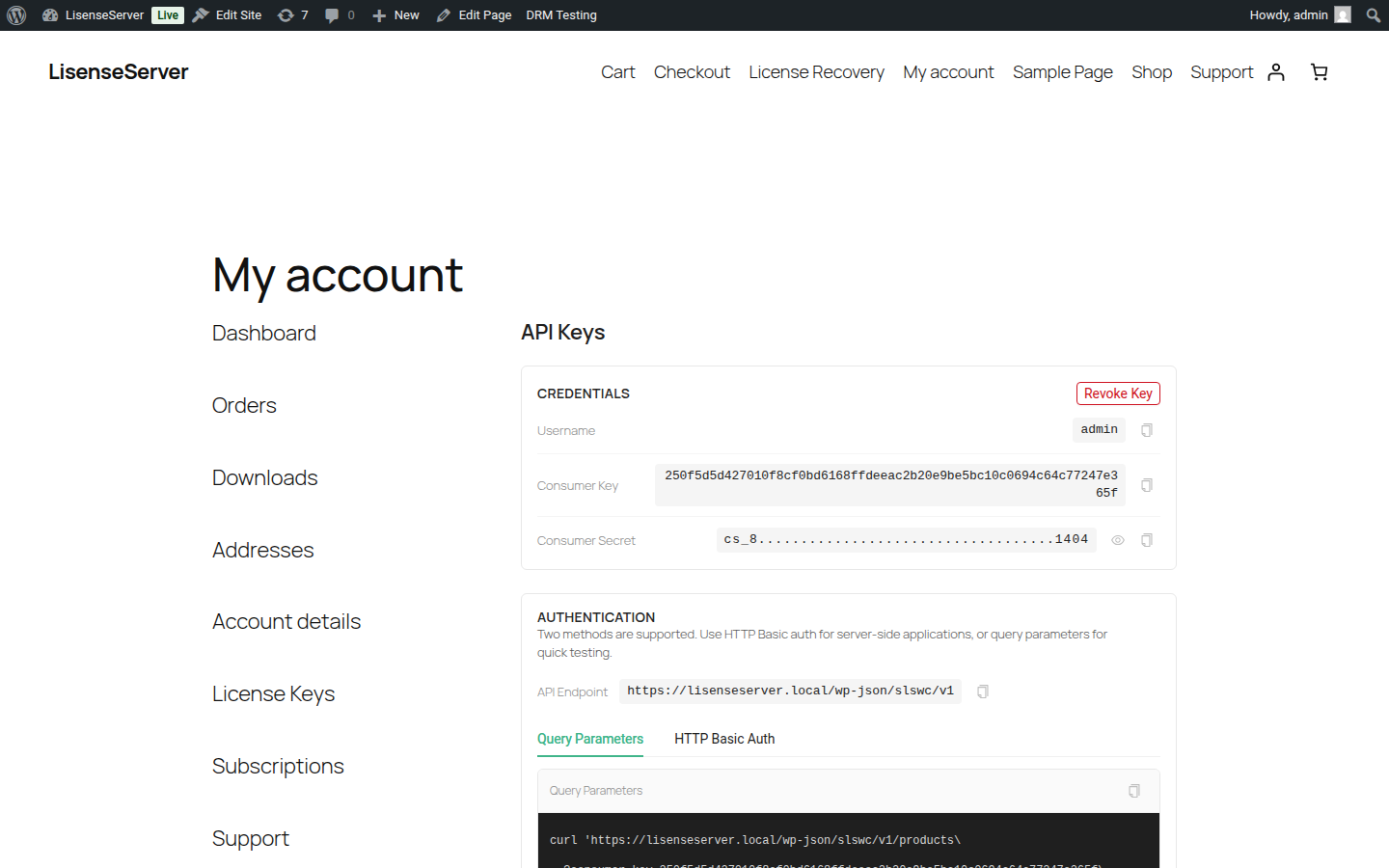
Navigate to My Account > API Key to generate and manage your API credentials.
Endpoint: /my-account/api-key/
What API Keys Are For
API keys let your plugins and themes authenticate with the license server to:
- Install packages via Composer — Use your credentials for HTTP Basic Auth when running
composer requireorcomposer update. - Access the REST API — Query the SLSWC API programmatically to verify licenses, check for updates, and manage activations.
Generating an API Key
If you do not have an API key yet, you will see a prompt to generate one.
- Click Generate API Key.
- Your credentials are created immediately:
- Username — Your account username.
- Consumer Key — A unique key starting with
ck_. This is stored hashed on the server and cannot be displayed again after you leave the page. - Consumer Secret — A secret key starting with
cs_.
Important: Copy your consumer key immediately and save it somewhere safe. It will not be shown again after you navigate away from the page.
Viewing Your Credentials
Once generated, the credentials section shows:
- Username — Always visible. Click the copy button to copy.
- Consumer Key — Shown in full only immediately after generation. On subsequent visits, only a truncated hash is displayed.
- Consumer Secret — Hidden by default. Click the eye icon to reveal it, or click copy to copy the value directly.
Authentication Methods
The API supports two authentication methods. Both are shown with ready-to-use code snippets.
Query Parameters
Pass your consumer key and secret as URL parameters:
curl '{your-store}/wp-json/slswc/v1/products\
  ?consumer_key=ck_your_consumer_key\
  &consumer_secret=cs_your_consumer_secret'
HTTP Basic Auth
Send your credentials as a Basic Auth header (recommended for server-side applications):
curl '{your-store}/wp-json/slswc/v1/products' \
  -u 'ck_your_consumer_key:cs_your_consumer_secret'
The API endpoint URL is displayed on the page and can be copied directly.
Revoking Your API Key
To revoke your current API key:
- Click Revoke Key.
- Confirm when prompted.
Revoking a key immediately invalidates it. Any connected applications (including Composer) will stop working until you generate a new key.
Security tip: Never expose your consumer secret in client-side code or public repositories.